Skip to content
saif.

A mobile app MVP for Android, iOS and the web, from one codebase

Saif Ali

Saif Ali, MVP developerBengaluru, India · builds MVPs for founders worldwideLast updated · 15 min read

In short

I'm Saif Ali, a mobile app MVP developer. Your MVP takes 2 weeks, $2,400 fixed. I build one Next.js app, live on the web, and wrap the same code with Capacitor for Android and iOS. It fits most first versions: accounts, bookings, payments, camera, notifications. Graphics-heavy games, AR and heavy background work need a native developer.

The Gozo kiosk runs as an Android app this way, in production. hibnus homes has a signed Android build in Play Store closed testing.

Not sure a web-based app is enough? Tell me the idea on a free 15-min call. I'll tell you if Capacitor fits or if you need a native developer, and the price.

The next sprint starts next week. Nothing to pay until you approve the plan on Day 2, then one week at a time.

“They built a complex MVP with Google Business and payment integrations in just two weeks.”
Matt Miller, Jobly (US client) · Read Jobly's 14-day MVP →
MVP Sprint · $2,400

What you get in 2 weeks

What the MVP Sprint gives you, read for a phone.

What a 2-week MVP Sprint includes, and what each part means for a phone app
PartWhat it means for a phone app
Designed for phones firstEvery screen is designed for a thumb on a small screen, then scaled up for desktop
Login and accountsOne account that works on the web and in the app
Your core workflowThe one thing your app must do, the same on the web, Android and iOS
Stripe paymentsCard payments for real-world goods and services. Digital subscriptions sold inside a store app follow Apple's and Google's billing rules, so we check yours on Day 1
Phone featuresThe ones your core workflow needs, such as the camera or notifications, through Capacitor plugins. Agreed in your Day 1 plan
Admin panelYou manage users and content from a browser
What you have on Day 10The web app, live on your domain, which you use on your own phone. And the Android and iOS app projects, the code that becomes your store apps, in your GitHub, built from the same code with Capacitor. Getting into the stores takes longer: the app store answer ↓

The rest of the sprint, from design to launch: what's in an MVP Sprint →

Pick the smallest that works

Web app, Capacitor app or native: which does your idea need?

Three ways to get onto phones, and one that isn't me. Pick the smallest that tests your idea. I settle it with you on Day 1, in your one-page plan, and you approve it on Day 2. Here's the 2-week plan, day by day.

Which kind of phone app an MVP idea needs, and whether it fits in 2 weeks
Your ideaWhat it takesFits in 2 weeks?
People should use it on their phones this month; the stores can waitAn installable web app: people add it to their home screen from the browser. On iPhone, they add it from Safari's Share menu. No store reviewYesHow hibnus homes and Hibnus Find launched
It must be in the App Store and Google Play, with the camera or notificationsYour Next.js app, wrapped for Android and iOS with CapacitorYes, the appGoing public in the stores usually takes longer: Apple and Google decide when. Why ↓
It drives hardware: printers, card readers, a kioskCapacitor plus native plugins for each device, tested on the deviceLongerGozo reached production in 26 days
A graphics-heavy game, 3D or AR, long jobs in the background, widgets or watch appsA native (Swift, Kotlin) or Flutter developer, not meNot meI'll say so on the call, before you pay anything. When native is better ↓
Proof, not promise

Apps I've built with Next.js and Capacitor

Gozo

Client · US · Join Gozo, Inc.

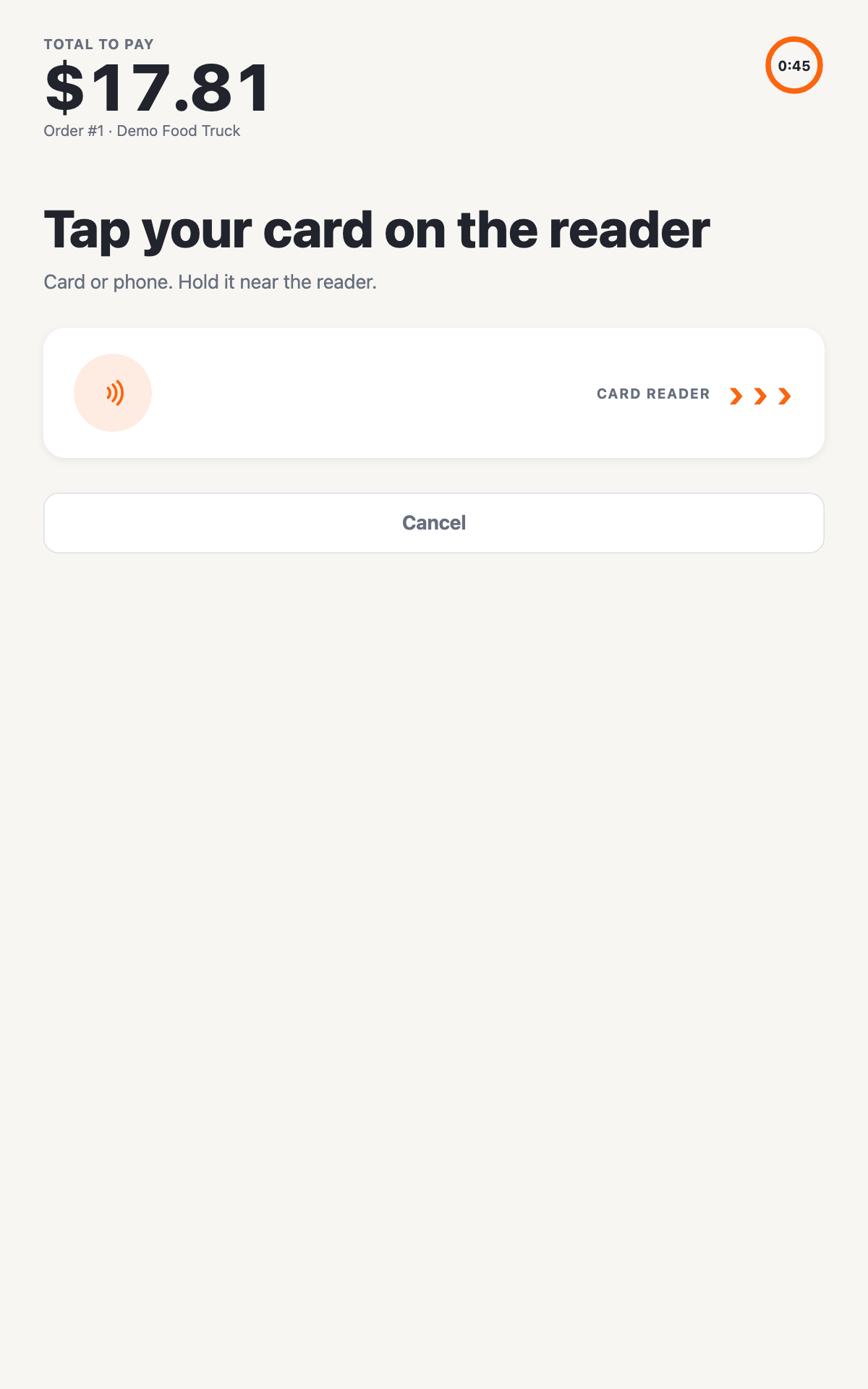
Self-order kiosks for food trucks. The kiosk is a web app that runs as an Android app on a real truck: customers order, tap their card to pay, and the ticket prints. I built native plugins for it, in Java, that drive:

  • the built-in printer, and a network kitchen printer, with its Wi-Fi set up over Bluetooth
  • the Stripe M2 card reader, for card payments at the window
  • kiosk lock and in-app updates

The kiosk app also starts itself when the device reboots. Three bugs showed up only on the device, in its old built-in browser: the colors vanished, API responses were blocked, and one failed start-up request left it stuck on "Loading…". All three were found on the device and fixed there.

26 daysfirst commit to production · taking real orders: 50+ per merchant

A Gozo self-order kiosk mounted at a food truck's window, showing Order Here
The kiosk on a truck. Real photo.
Gozo kiosk payment screen asking the customer to tap their card on the reader, shown with demo data
Demo dataTap to pay on the kiosk.
For technical co-founders: Gozo's stack

The kiosk is a Next.js 14 static export with Capacitor 6 on a Sunmi K2 Mini, an Android device with a built-in printer. Kiosk lock is Android device-owner mode. One pnpm monorepo holds the kiosk app, the phone storefront, the owner portal and the NestJS API, with shared Zod schemas for the data rules.

Read the Gozo story →

hibnus homes

My own product
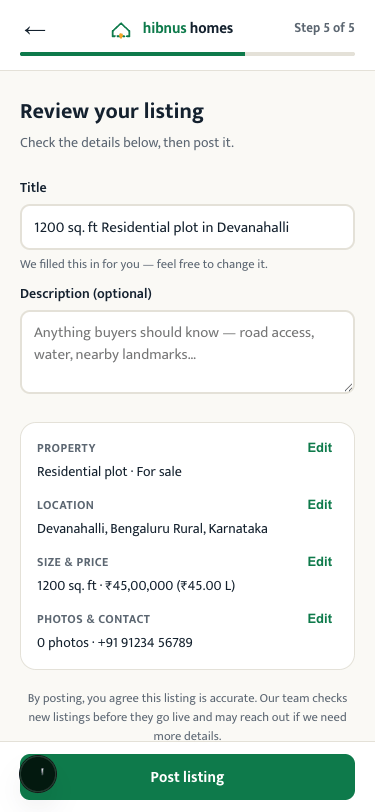
hibnus homes listing wizard on a phone, step 5 of 5: reviewing a residential plot for sale in Devanahalli, with its size, price and WhatsApp number, before posting
Demo dataThe web app on a phone. The Android app wraps these same screens.

A marketplace for rural land and homes in India. The Next.js 15 web app is live at hibnushomes.com. The Android app wraps the same web app with Capacitor, with the camera, push notifications, splash screen and status bar. The iOS project is the same wrapper, waiting on Apple's developer account approval, so it hasn't been through Apple's review yet (why ↓).

Try it: open hibnushomes.com on your phone and add it to your home screen. The listings need a phone-number sign-in with a one-time code.

  • Web live
  • Android signed · Play Store closed testing
  • iOS project ready · waiting on Apple

A standalone native app (a Flutter rewrite) is deferred, by design, and written down with a reason in its decision records.

14 daysto the MVP · full product in about 5 weeks · 100% test coverage

Read the hibnus homes story →

Hibnus Find

My own productNo Capacitor · installable web app

It went the other way. It was first built as a Flutter app, then I rebuilt it as an installable Next.js web app. One web deployment replaced the separate mobile and admin builds. It's live at hibnusfind.com, and you can install it from your phone's browser.

6 working daysFlutter app to installable web app

Read the Hibnus Find story →

Want your idea on phones? Tell me about it on a free 15-minute call. You'll leave knowing if Capacitor fits, and the price.

Book a 15-min call
No jargon

What Capacitor is, in plain words

Capacitor takes your web app and puts it inside a real Android and iOS app. The screens are your web app, running in the phone's built-in browser engine (a WebView). Plugins give it the phone's camera, notifications and other features. People download it from the store like any other app, with its own icon. And you keep one codebase instead of three: the website, the web app, the admin panel and the phone apps.

Two ways to wrap a Next.js app with Capacitor

You don't have to choose this yourself. I settle it with you on Day 1, in your plan. For a store app, shipping the screens inside the app is the safer way. hibnus homes loads the live site and hasn't faced Apple's review yet, so it isn't proof that way gets approved.

How Gozo does itSafer for the stores

Inside the app

The screens ship inside the app itself. Bundling also decides how I build the server side, so it's in your Day 1 plan.

Good
It opens without loading a website, and it's the way Capacitor expects an app to ship.
Watch out
Changing the screens means a new build. For a store app, that's a new store release and review. Gozo's kiosks skip the stores: they're locked devices, and their updates come through an in-app updater (one of the Java plugins), started from the kiosk's staff settings.
How hibnus homes does it

Loading the live site

The app opens your live web app, the same one people use in a browser.

Good
Fix a bug on the web and the phone app has the fix too, with no new store release.
Watch out
It needs a connection, and changes to the native parts still need a release. Capacitor's own docs call a live URL a setting for development, not production. Apple can turn down an app that mostly repackages a website.
For technical co-founders: what each way rules out

Inside the app: the Next.js app is exported as static files and shipped in the app. Static files can't run server code on the phone (server actions, API routes, middleware), so the server side lives in a separate API, like Gozo's NestJS backend. A static export also changes three things a Next.js developer checks first: dynamic routes need generateStaticParams or client-side fetching, the default next/image optimizer doesn't run, and a login cookie has to work between the app's own origin and your API's domain. That's why the choice is made on Day 1: it decides how the server side and the login are built.

Loading the live site: the app keeps everything the web app has, but it needs a connection, and Capacitor's docs say server.url is "not intended for use in production". hibnus homes uses this way. Its separate NestJS API isn't there because of the wrap: it keeps the session check in one service.

Honest answer

When a native app is better

Capacitor covers most first versions. Not all of them. If yours is in this list, I'll tell you on the call, before you pay anything.

  • Go native

    Graphics-heavy games, 3D and AR

    They need the phone's graphics hardware at full speed, and a WebView isn't built for that.

  • Go native

    Work that runs with the app closed

    All-day location tracking, audio playback, big background syncs. These lean on native code.

  • Go native

    Widgets, watch apps, deep OS features

    Home-screen widgets, Apple Watch and car screens are built as separate native pieces, outside the WebView.

  • Go native

    Screens where every frame counts

    Long, heavy lists with complex animations that must feel exactly like the phone's own apps. Most MVPs aren't this.

  • Capacitor is plenty

    Everything else in most MVPs

    Sign-up, forms, lists and search, bookings, payments, photo uploads and notifications.

Starting in Capacitor doesn't lock you in. Your data, user accounts and server side can carry over; if you go native later, the screens get rebuilt. hibnus homes' decision records name a native Flutter rewrite as a later option, deferred by design. That rewrite would be a job for a Flutter or native developer, not me.

Two 5-day sprints

How the 2 weeks work for an app

Same plan as every MVP Sprint: two 5-day sprints, Monday to Friday. You see progress every few days, on your own phone.

Before the sprintA free 15-minute call

  1. Before · Call

    Call

    15 minutes on your idea, your users and the one thing it must do.

  2. Days 1–2 · Plan

    Plan

    Day 1: I turn our call into a one-page plan: web only or Android and iOS too, which phone features, what we skip, and the price. Day 2: you approve it and pay for week 1, then I start.

  3. Days 3–8 · Build

    Build

    A live demo link every 2–3 days, and a short video update. The link is the web app, which you open in your phone's browser. Your feedback goes straight in.

  4. Days 9–10 · Launch

    Launch

    The web app goes live on your domain and is handed over. The Android and iOS app projects, the code that becomes your store apps, sit in your GitHub with the rest of the code, built from it with Capacitor. Submitting them to the stores is part of the sprint when it's in the agreed scope. Before launch: tests, a security check and a mobile speed check aiming for 90+ in Lighthouse.

The full 2-week plan, day by day →

Before the call

Before the call: your app checklist

Bring what you can. Items 3 to 7 only matter if you want the App Store or Google Play.

  1. Decide if you need the stores on day one, or if an installable web app is enough to start.
  2. List the phone features your core workflow can't work without: camera, notifications, location. Keep it short.
  3. Want the stores? Each store needs a developer account before an app can go live. Open it in your company's name, so the store apps are yours; each store charges its own fee. Apple checks who you are first, and a company also needs a D-U-N-S number, so it can take a while. hibnus homes' iOS app is waiting on this step now. Bring it up on the call.
  4. Selling digital content or subscriptions inside the app? Apple and Google have their own billing rules. Bring it to the call. Real-world goods and services can use Stripe.
  5. Have a privacy policy page ready. Both stores ask for one, plus a privacy form: Apple's privacy labels and Google Play's Data safety form, which say what data the app collects.
  6. If people can sign up, they must be able to delete their account from inside the app. Both stores require it.
  7. Want "Sign in with Google" or another social login? Apple then asks for a private login option too, usually Sign in with Apple.
  8. Pick an app name and an icon that still reads when it's small.
Where the store rules on this page come from (checked 14 Nov 2026)
  1. Apple's App Review Guidelines: 4.2 (more than a repackaged website), 4.8 (login services), 5.1.1(v) (account deletion), 3.1.1 (in-app purchase)
  2. Apple Developer Program enrollment (D-U-N-S number for organizations) and App privacy details
  3. Google Play Console Help: testing requirements for new personal accounts, account deletion, Data safety, payments policy
  4. Capacitor's configuration docs: server.url is "not intended for use in production"
  5. Next.js static exports: unsupported features (dynamic routes without generateStaticParams, the default image loader, server actions, middleware)
Prices in USD

Price

Prices for a mobile app MVP
What you needTimePrice
Mobile app MVP: the web app, plus Android and iOS app projects, from one codebase2 weeks$2,400$1,200 a week, fixed, agreed before work starts
Not sure anyone wants it yet? ValidateLanding page, waitlist, clickable prototype, analytics1 week$1,200
An app that drives hardware, or a marketplace with paymentsMore than 2 weeksPriced on the call, from what you need
After launch: Keep buildingWeek by week$1,000a week

Paid weekly, before each week starts, by card or Wise. Small jobs, before or after launch: $50/hour, only for hours you approve. Hosting, domains and paid services (Stripe fees, email, SMS) are billed to your own accounts at their normal rates, so you own them. Apple and Google charge their own developer account fees, separate from the sprint price. Store submission is part of a sprint when it's in that sprint's agreed scope. Full details on the pricing page.

FAQ

Questions about a mobile app MVP

Can you build a mobile app MVP in 2 weeks?

Yes, for a focused first version. One Next.js app, live on the web, with Android and iOS app projects wrapped from the same code with Capacitor, for $2,400: two 5-day sprints at $1,200 a week. Apps that drive hardware, like Gozo's kiosk, take longer. If yours needs more, you'll know from the Day 1 plan, before you pay.

How much does a mobile app MVP cost?

A mobile app MVP with me is $2,400 for the web app plus Android and iOS app projects, from one codebase: $1,200 a week, fixed and agreed before work starts. Agency cost guides commonly quote $10,000–50,000 and 1–4 months for a first version. An app that drives hardware, or a marketplace with payments, takes more than 2 weeks and is priced on the call. See what others charge →

Is a Capacitor app a real app?

Yes. Once Apple and Google approve it, it installs from the App Store or Google Play like any other app, has its own icon, and uses the camera, notifications and other phone features through plugins. Inside, the screens are your web app running in the phone's WebView. For sign-up, forms, lists, bookings and payments, that's plenty. Apple expects an app to do more than repackage a website. Real phone features help, like the camera and push notifications in hibnus homes' Android app, but Apple still decides. Your Day 1 plan names the ones yours uses. Getting approved ↓

Why Capacitor and not Flutter?

Because one Next.js codebase gives you the website, the web app, the admin panel and the phone apps. Flutter means a second codebase next to your web app. Hibnus Find started in Flutter, and I rebuilt it as one web app in 6 working days. I don't write Flutter or fully native (Swift or Kotlin) code. The Hibnus Find story →

Will my app be in the App Store and Google Play?

Usually not by Day 10. Building the app fits in the 2 weeks; going public takes longer, because Apple and Google review every app and decide when. Each store needs a developer account first, opened in your company's name, so the store apps are yours. Apple checks who you are, and a company also needs a D-U-N-S number. Google asks a new personal account to run a closed test with at least 12 testers for 14 days before it can go public. hibnus homes is at that step now: its signed Android build is in Play Store closed testing, and its iOS project is waiting on Apple's developer account approval, so it hasn't been through Apple's review yet. I follow both stores' rules, and submitting to them is part of a sprint when it's in that sprint's agreed scope. Ask me on the call what that means for your app.

Can the app use the camera, notifications or hardware?

Yes, through Capacitor plugins. hibnus homes' Android app has the camera and push notifications. On Android, when no plugin fits, I write one in Java: Gozo's printers, card reader, kiosk lock and in-app updates run on native plugins I built. The custom plugins I've written so far are Android ones. If your iOS app needs a phone feature no plugin covers, bring it to the call.

When should I build a fully native app instead?

When it's a graphics-heavy game, 3D or AR, runs long jobs with the app closed (all-day location, audio), or needs widgets or watch apps. Then a native developer is the right hire, and I'll say so on the call. For sign-up, forms, lists, bookings and payments, Capacitor is plenty. When native is better ↑

Can my app take payments?

Yes. Real-world goods and services, like a food order or a booking, can take card payments with Stripe: Gozo takes card payments on its Android kiosk. Digital content or subscriptions sold inside a store app follow Apple's and Google's billing rules, so we check yours on Day 1. How I build Stripe payments →

Who owns the code?

You do, from day one. It lives in your GitHub: one codebase for the web, Android and iOS, so any developer can pick it up later.


Free 15-min call

Want your idea on phones? Let's build it in 2 weeks.

Book a free 15-minute call. You'll leave with a clear plan, even if we don't work together. The next sprint starts next week.

Prefer email? saif@imshaiksaif.dev